ShopDreamUp AI ArtDreamUp
Deviation Actions


Suggested Deviants


Suggested Collections


You Might Like…


Featured in Groups

Description
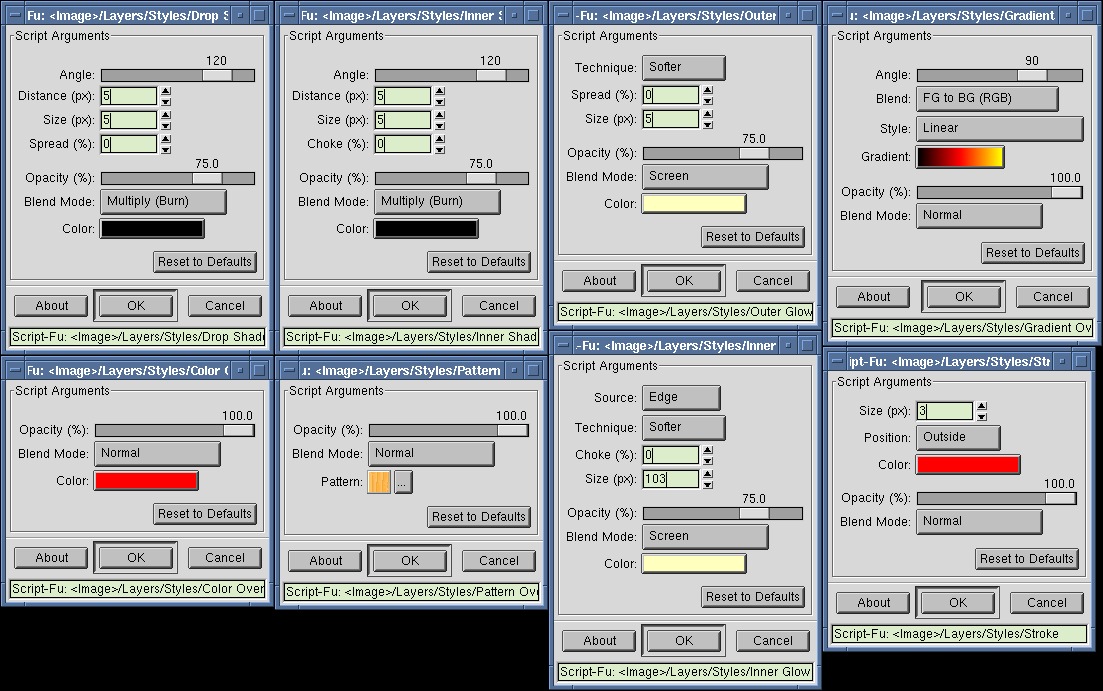
An incomplete set of layer styles for The GIMP, including:
 Drop Shadow
Inner Shadow
Outer Glow
Inner Glow
Color Overlay
Gradient Overlay
Pattern Overlay
Stroke
To add or update a layer style, simply select the layer style's parent layer - the layer the style will or already belongs to - and call the action. This also works from any of the other layer style layers the parent layer has. The scripts will automaticaly find the correct parent layer and/or layer style layer to update.
To be able to run these scripts, you'll first need to install these two scripts, which function as library routines for the layer style scripts:
 Select Layer Fill
Calculate Offsets
The scripts introduce two limitations:
 You can now only use 9998 layers in one image
The layer styles get "rasterized" when you duplicate your image

Drop Shadow Inner Shadow Outer Glow Inner Glow Color Overlay Gradient Overlay Pattern Overlay StrokeTo add or update a layer style, simply select the layer style's parent layer - the layer the style will or already belongs to - and call the action. This also works from any of the other layer style layers the parent layer has. The scripts will automaticaly find the correct parent layer and/or layer style layer to update.
To be able to run these scripts, you'll first need to install these two scripts, which function as library routines for the layer style scripts:
Select Layer Fill Calculate OffsetsThe scripts introduce two limitations:
You can now only use 9998 layers in one image The layer styles get "rasterized" when you duplicate your image © 2003 - 2024 the-gimp
Comments11
Join the community to add your comment. Already a deviant? Log In

Thank you so much for this.